


Briefing data carries into the plan
Departure, destination, route, aircraft profile, and briefing context move into the filing workflow instead of forcing you to rebuild the flight from a blank form.
AI briefing + FAA flight plan filing
PilotBriefAI reads live METARs, TAFs, NOTAMs, route hazards, your saved aircraft, and your personal minimums, then carries that briefing context directly into a real VFR or IFR flight plan filed through Leidos Flight Service.
Brief, judge, file, amend, activate, close, and let AI Wingman keep watching the route. Keep your EFB for charts, plates, and cockpit navigation.
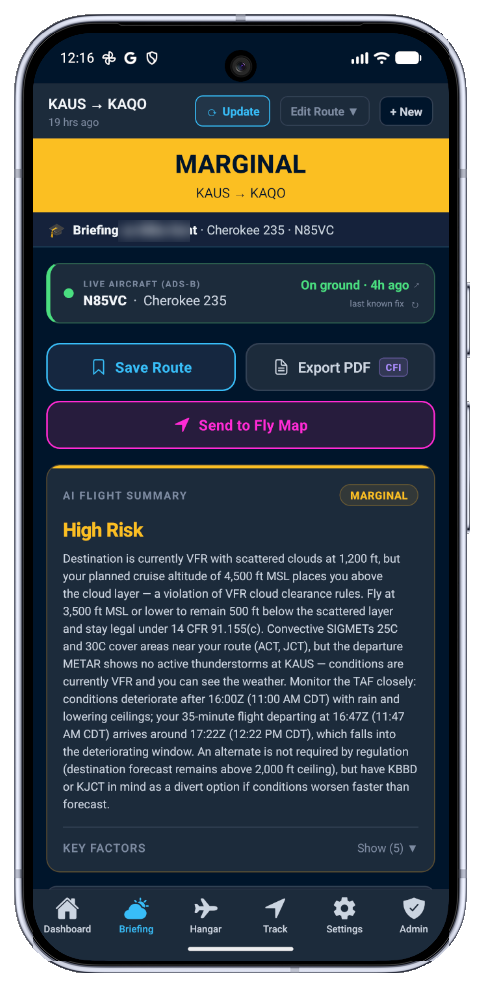
Flight plan filing
PilotBriefAI now manages the flight plan filing process in app: file, amend, activate, and close real FAA flight plans through Leidos Flight Service. The difference is what happens before you tap submit. Your AI flight briefing, saved aircraft, route, fuel context, personal minimums, and route hazards are already there, so the plan is checked before anything is transmitted.
Departure, destination, route, aircraft profile, and briefing context move into the filing workflow instead of forcing you to rebuild the flight from a blank form.
Personal minimums and aircraft limits stay attached to the filing decision, so PilotBriefAI can flag a plan that breaks your own rules before it reaches the FAA.
After filing, AI Wingman monitors the route corridor and alternate picture and tells you when changes are meaningful enough to review or amend.
"Crosswind 18 kt at KDFW. Your max is 15. File anyway?"
PilotBriefAI's filing gate, shown before transmission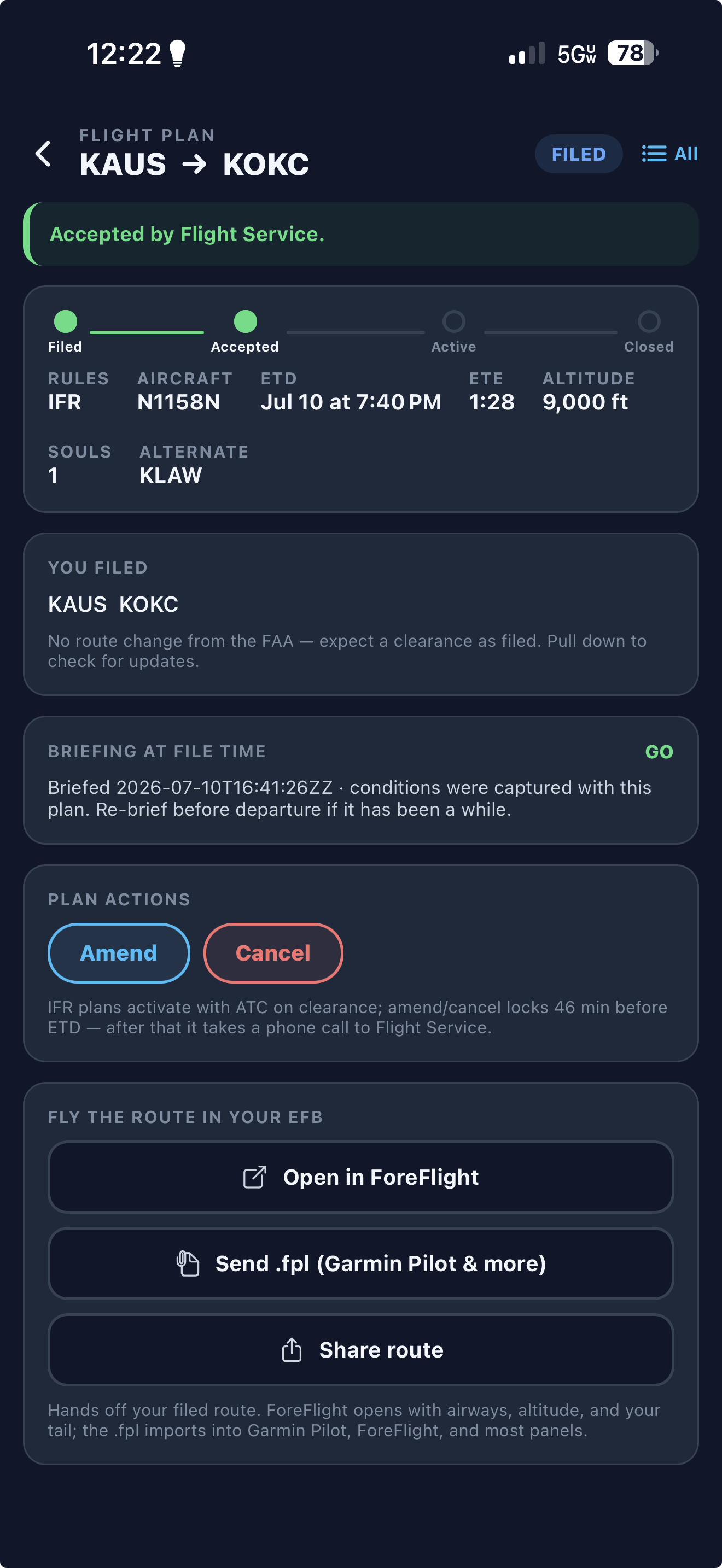
Accepted by Flight Service
See filed, accepted, active, and closed status in one place, amend or cancel when the window allows, and hand the filed route to ForeFlight, Garmin Pilot, or your panel when it is time to fly.
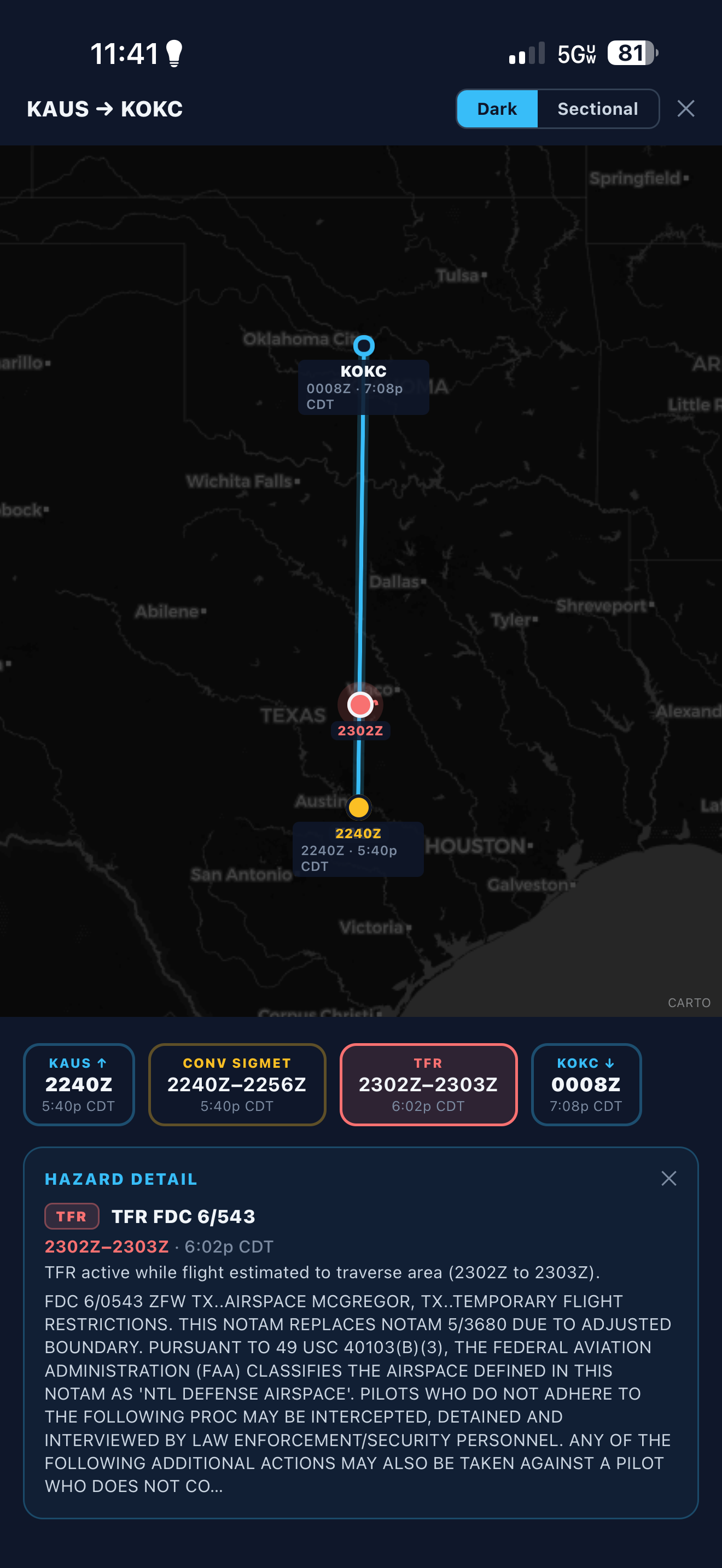
Route hazard timeline
The brief maps hazards along your route and orders them by estimated encounter time. A TFR, convective SIGMET, or destination change is tied to the route segment and clock time that matter for this flight.
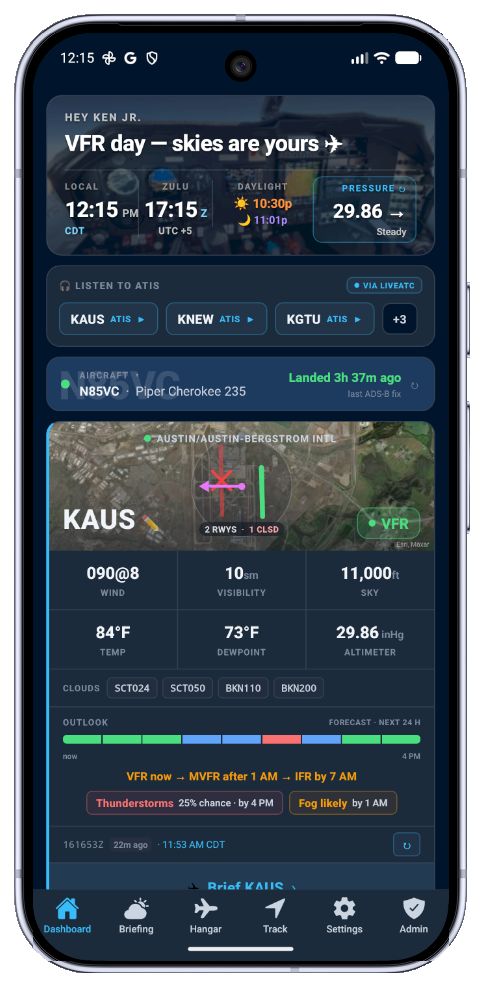
Pilot weather dashboard
PilotBriefAI opens on the airport picture that matters most: your watched field, favorite ATIS frequencies, live METAR category, runway wind, ceiling, visibility, sunset/night timing, nearby advisories, and one-tap access to the full AI flight briefing.
Jump straight to KAUS, KNEW, KGTU, or any saved airport without hunting through menus.
Flight category, wind, visibility, ceiling, runway wind, density altitude, and advisories stay visible in one scan.
Tap the airport card to move from dashboard awareness into the Claude-powered Go / Marginal / No-Go briefing.
Live Track
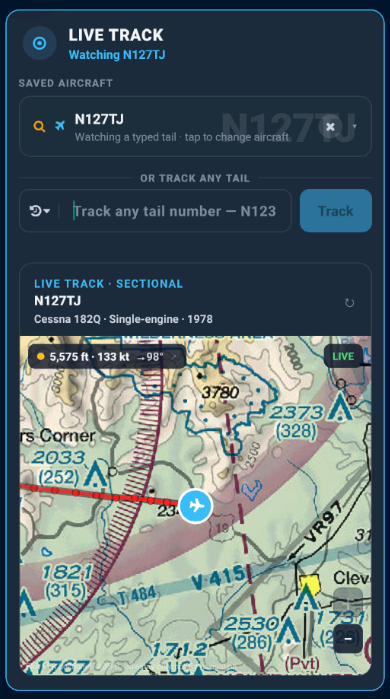
Live Track lets you follow a saved aircraft or spotlight any N-number on the map. PilotBriefAI pulls the aircraft identity, paints the track over a VFR sectional, and keeps speed, altitude, and heading context visible while you watch.
Tail, make, model, type, and saved-aircraft state stay attached to the live track.
The track sits on terrain, roads, airspace, and route context instead of an abstract radar list.
Portable ADS-B receiver support
PilotBriefAI connects to any ADS-B receiver that broadcasts standard GDL90 over Wi-Fi on UDP port 4000. Join the receiver's Wi-Fi network, open FLY, and paid plans can show live ownship and traffic on your sectional.

PIREPs along your route
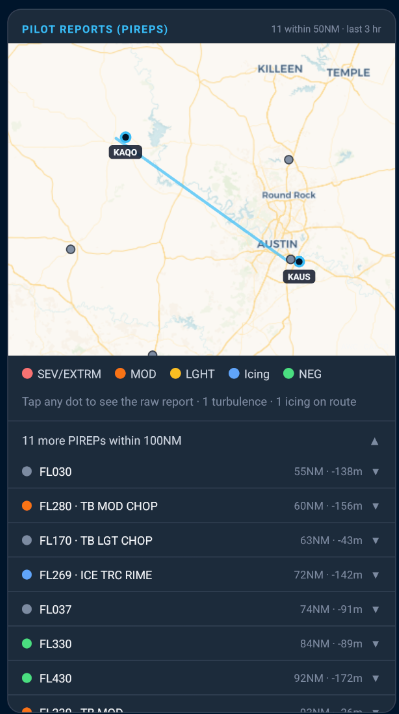
Most weather apps dump every PIREP filed in a 200-mile radius into a list and let you sort it out. PilotBriefAI does something different: it maps only the reports that fall near your actual flight corridor — then lets you tap any dot to read the raw report, or ask Claude to explain what it means for your route, your altitude, and your aircraft right now.
Turbulence at FL170 fifty miles north of your corridor at the wrong altitude isn't your problem. The MOD icing report 12 miles west at your cruise altitude absolutely is. We show you the difference.
Weather Explorer
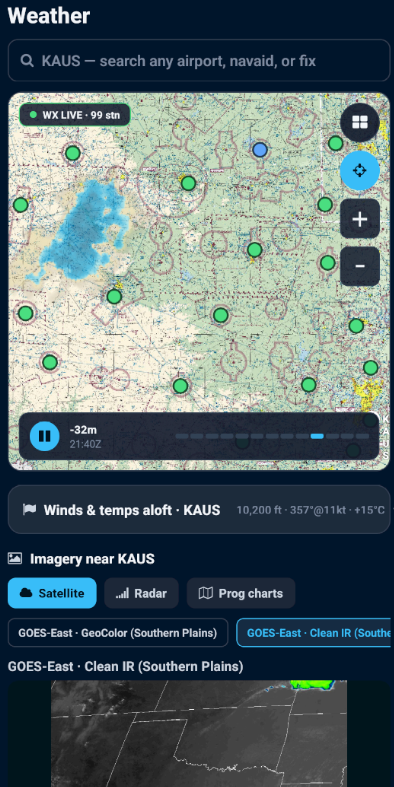
Pick any airport, fix, or navaid and Weather Explorer gives you an interactive weather workspace: animated radar, flight-category station dots, winds and temps aloft, and NOAA/NWS imagery without leaving the briefing flow.
Station dots keep VFR, MVFR, IFR, and LIFR context visible while you pan.
Watch precipitation move over the same sectional-style map you use for route context.
See the winds layer tied to the selected point instead of hunting through decoded text.
Satellite, radar, and prog chart tabs keep the raw picture one tap away.
Brief. Listen. Fly with context.
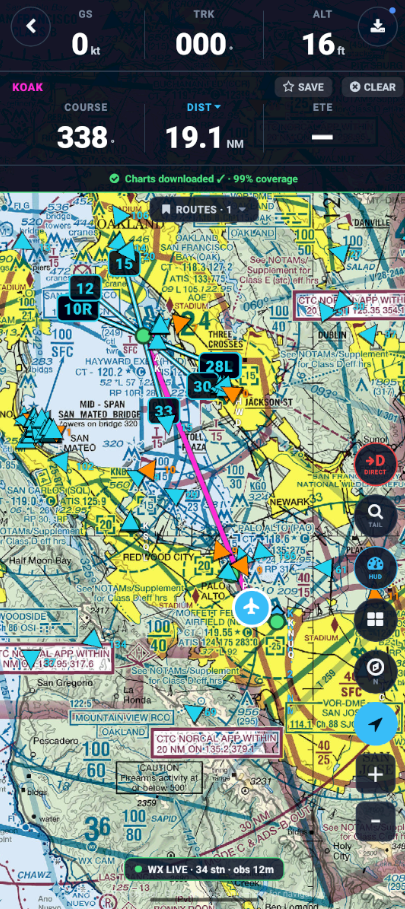
PilotBriefAI brings the sound of the field and a VFR flying picture into one workflow. FLY is a supplemental situational-awareness aid for VFR pilots, not a certified navigation source or replacement for your EFB.
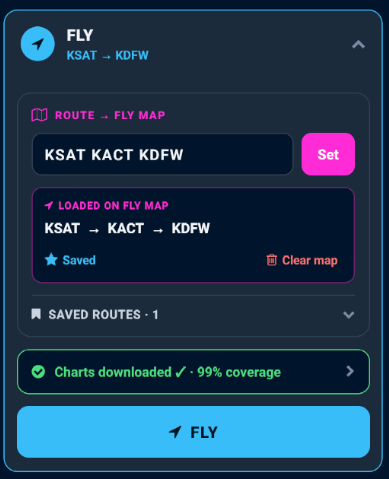
Set a route, save it, and download chart coverage before you go so the sectional stays available when the signal gets thin.
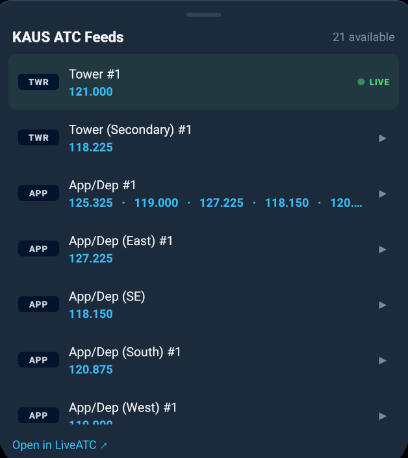
Stream tower, ground, and CTAF from LiveATC.net in the briefing flow so you hear the field before you key the mic.

See your VFR sectional, downloaded charts, live METARs, weather overlays, Direct-To guidance, route lines, and ADS-B traffic in one aid for VFR situational awareness.
AI Wingman
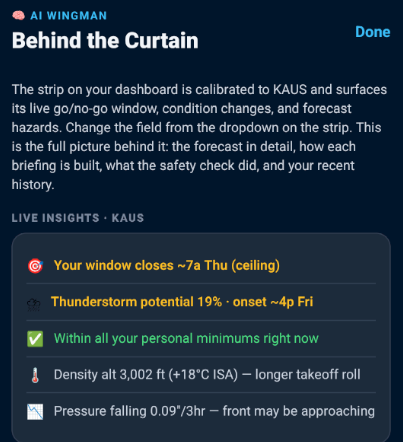
AI Wingman continuously watches your selected airport, compares live METARs, forecast trends, hazards, and personal minimums, then surfaces the single insight most worth your attention before you brief.
Wingman promotes what changed or matters now, then lets you open the full context when you need it.
Behind the Curtain shows the forecast detail, recent history, and why the safety call was made.
Switch the airport from the strip and Wingman rebuilds the watch around that location.
Included with IFR and CFI, alongside alternates, winds aloft, NBM forecast, and terrain awareness.
IFR alternate intelligence
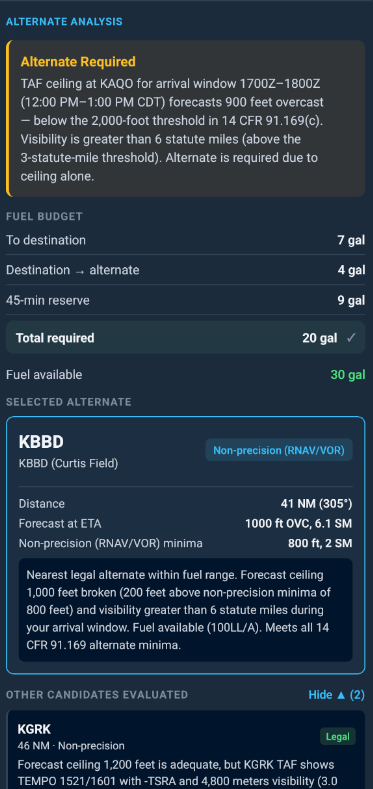
PilotBriefAI does more than flag the 1-2-3 rule. It evaluates forecast ceiling and visibility, fuel budget, distance, approach type, and alternate minimums, then explains why the selected airport is or is not a practical out.
Alternate requirements are checked against forecast arrival windows, non-precision minima, visibility thresholds, and fuel available.
Claude compares candidates so pilots see the nearest legal option, the weather risk, and the reason behind the recommendation.
For flight instructors
A dedicated CFI workflow built into the app: student profiles, fleet management, AI teaching notes, Mock Oral checkride practice, and live ADS-B monitoring in one place.
Certificate level, currency, personal minimums, and training focus kept separate for every student.
Aircraft profiles by tail, type, crosswind limit, and equipment — so every briefing uses the right airplane.
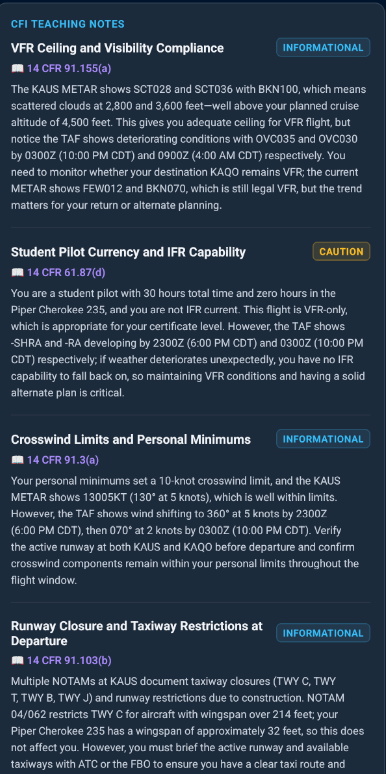
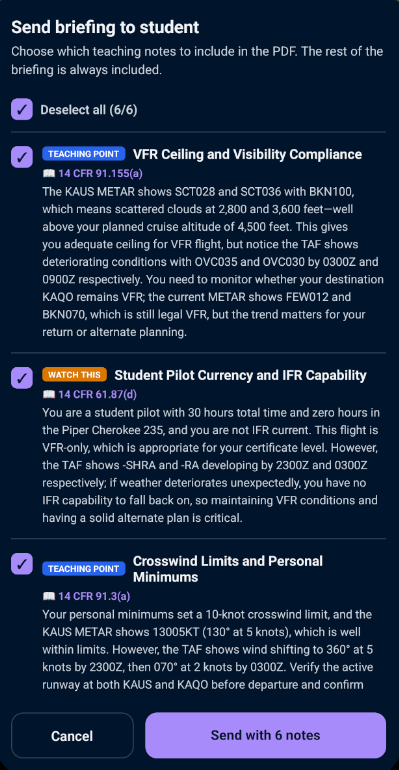
Claude surfaces FAR/AIM-cited teaching points with space for your own CFI notes, shareable by email or text.
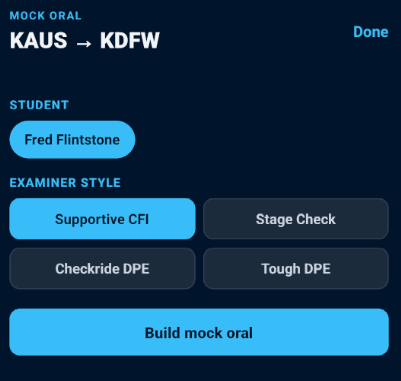
Turn the student's exact briefing into a DPE-style oral with examiner tone, grounded questions, scoring, and debrief output.
Send the briefing, then follow the student on live ADS-B as they fly.
Mock Oral

Every solo XC review already contains the raw material a DPE will use: route, weather, NOTAMs, fuel, aircraft, student minimums, and go/no-go reasoning. Mock Oral turns that exact brief into a structured examiner-style session you can run before the student ever leaves the room.
Questions are built from the student's actual KAUS -> KDFW route, live TAFs, fuel math, alternates, NOTAMs, and personal minimums.
Start supportive, step up to stage-check pressure, then run it like a checkride DPE when the student is ready.
Mark Got it, Partial, or Missed as you go, then turn the misses into a focused study list instead of a forgotten ramp debrief.
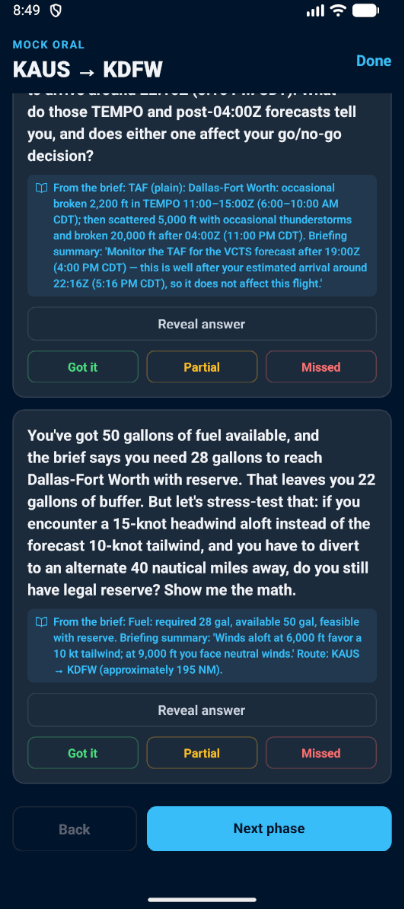
Weather, fuel, route, and minimums stay tied to the question so the CFI can coach judgment, not memory tricks.
Works with what you already fly
ForeFlight and Garmin Pilot are brilliant for charts, plates, and cockpit navigation. PilotBriefAI is different because it turns your AI briefing, saved airplane, personal minimums, and route hazards into a filing decision, then lets you manage the filed plan in app while AI Wingman keeps watching.
Claude synthesizes live weather, route hazards, aircraft data, and personal minimums into a go/no-go judged for this flight.
The route and saved aircraft flow into the filing workflow, with a minimums gate before the plan is sent through Leidos Flight Service.
Manage file, amend, activate, and close in app, while AI Wingman watches the route and your EFB handles charts, plates, and navigation.
Your EFB files what you type. PilotBriefAI knows what you briefed, what you fly, and what your route will encounter before it sends the plan.
| Capability | Raw weather sites | EFBs like ForeFlight / Garmin Pilot | PilotBriefAI |
|---|---|---|---|
| Live METAR / TAF / NOTAM data | Yes | Yes | Yes |
| Charts, plates, and cockpit navigation | No | Yes | No, keep your EFB |
| FAA flight plan filing through Leidos Flight Service | No | Yes | Yes |
| AI go/no-go gate before filing | No | No | Yes |
| Route hazard timeline by estimated encounter time | No | Partial | Yes |
| FLY VFR sectional map with offline chart downloads | No | Partial | Yes |
| AI pilot weather briefing with Go / Marginal / No-Go judged against your personal minimums | No | No | Yes |
| Plain-English PAVE risk synthesis | No | No | Yes |
| Route PIREPs mapped and interpreted by AI | No | Partial | Yes |
| Live ATC audio in the briefing flow | No | No | Yes |
| Supplemental FLY sectional aid with offline maps, METARs, weather, Direct-To, and ADS-B traffic | No | Partial | Yes |
| Role in your workflow | Source data | Navigate and fly | Brief, judge, file, monitor |
Complete preflight briefing
PilotBriefAI pulls from 8+ live FAA/NOAA sources for the briefing, then keeps filing separate and direct through Leidos Flight Service. Claude writes the decision-support judgment around the data; Flight Service handles the actual plan transmission.
Live ATC audio, ADS-B traffic, and FLY VFR sectional context built into the briefing flow — not separate apps you have to juggle at the ramp.
Live FAA/NOAA feeds displayed exactly as received with color-coded flight categories and your aircraft limits applied.
Claude reads every source together and writes the sections that require judgment — a verdict checked against your specific certificate, minimums, and aircraft, not a summary of decoded strings.
Raw weather tools show conditions. PilotBriefAI checks those conditions against your personal minimums, certificate level, aircraft profile, and route context, then explains the risk in pilot language.
Conditions are inside your minimums, with no major route blockers identified.
Flyable only with mitigation, alternates, and careful verification against official sources.
Conditions or hazards exceed your profile, aircraft, or route risk limits.
Decision-focused planning
From VFR go/no-go decisions to IFR alternate planning to CFI teaching moments, the app is organized around the decisions that actually matter before flight.
Departure, destination, and alternate weather analyzed in one briefing so you know your outs before you go.
For serious GA pilots who need more than legal minimums and a wall of decoded weather strings.
Manage students, aircraft, teaching notes, and shared briefing records from one instructor workflow.
Why PilotBriefAI is different
Every briefing is judged against your certificate level, preferences, weather limits, and aircraft profile.
Use PilotBriefAI to brief, judge, file, and monitor; keep ForeFlight or Garmin Pilot for charts, plates, and cockpit navigation.
AI weather synthesis, route hazard timelines, live ATC audio, and live ADS-B on sectionals in a single app.
Filing runs through Flight Service; AI guidance is decision support. The go/no-go is always yours.
Simple pricing
The website does not sell subscriptions directly. Download PilotBriefAI, activate the 14-day trial in the app, then choose a plan through the App Store or Google Play when you are ready.
3 briefings total. No credit card.
$3.33/mo · billed annually
$5.00/mo · billed annually
$10.00/mo · billed annually
| Feature | Free | VFR | IFR | CFI |
|---|---|---|---|---|
| Core | ||||
| Live METAR and Go/No-Go analysis | Yes | Yes | Yes | Yes |
| Personal minimums profile | Yes | Yes | Yes | Yes |
| Animated weather maps powered by Windy | Yes | Yes | Yes | Yes |
| Briefings included | 3 total | 30/mo | Unlimited | Unlimited |
| Saved routes | 0 | 10 | Unlimited | Unlimited |
| Favorite airports | 3 | 10 | Unlimited | Unlimited |
| Aircraft profiles | 1 | 3 | Unlimited | Unlimited |
| VFR Planning and Safety Suite | ||||
| AI multi-airport route briefing | - | Yes | Yes | Yes |
| Crosswind component analysis | - | Yes | Yes | Yes |
| Density altitude and performance | - | Yes | Yes | Yes |
| IMSAFE personal check | - | Yes | Yes | Yes |
| AI route hazard analysis | - | Yes | Yes | Yes |
| Route hazard timeline by estimated encounter time | - | Yes | Yes | Yes |
| Flight plan filing through Leidos Flight Service | - | Yes | Yes | Yes |
| File, amend, activate, and close in app | - | Yes | Yes | Yes |
| Fuel and FBO availability on route | - | Yes | Yes | Yes |
| Live ATC audio | - | Yes | Yes | Yes |
| Weather Explorer maps and imagery | - | Yes | Yes | Yes |
| FLY VFR sectional map with offline chart downloads | - | Yes | Yes | Yes |
| Direct-To, live METARs, route lines, and weather overlays in FLY | - | Yes | Yes | Yes |
| Live tail tracking on VFR sectional | - | Yes | Yes | Yes |
| Open GDL90 Wi-Fi ADS-B receiver support | - | Yes | Yes | Yes |
| IFR Planning Suite | ||||
| AI Wingman live watch-field monitor | - | - | Yes | Yes |
| Filed route and alternate monitoring after filing | - | - | Yes | Yes |
| AI Alternate Advisor with fuel budget and minima analysis | - | - | Yes | Yes |
| AI winds aloft and altitude advisor | - | - | Yes | Yes |
| Hourly NBM point forecast | - | - | Yes | Yes |
| AI terrain awareness | - | - | Yes | Yes |
| CFI Instructor Toolkit | ||||
| Mock Oral checkride practice from the student's live briefing | - | - | - | Yes |
| AI teaching callouts with FAR/AIM citations | - | - | - | Yes |
| Student profiles | - | - | - | Unlimited |
| Fleet aircraft management | - | - | - | Yes |
| Email/text briefing share with CFI notes | - | - | - | Yes |
| FLY map and live ADS-B student flight watch | - | - | - | Yes |
| Briefing PDF export and share | - | - | - | Yes |
| Early access and priority in-app support | - | - | - | Yes |
Pilot objections, answered
Yes, and keep them. PilotBriefAI now files real FAA flight plans through Leidos Flight Service, but it does not replace charts, plates, or certified cockpit navigation. Use PilotBriefAI to brief, judge, file, amend, activate, close, and monitor; use your EFB where you need chart and navigation workflows.
Weather apps show conditions. PilotBriefAI uses Claude to interpret those conditions against your personal minimums and aircraft, shows hazards in the order you will encounter them along the route, carries that context into filing, then lets AI Wingman keep watching after the plan is filed.
Use PilotBriefAI for the route-aware briefing and filing workflow, then fly with the EFB or panel setup you already trust. The filed route can be handed to ForeFlight, exported as an .fpl for Garmin Pilot and other tools, or shared when you need it outside the app.
Paid plans can file, amend, activate, and close VFR or IFR flight plans through Leidos Flight Service. PilotBriefAI carries over your route, saved aircraft, and briefing context, shows Flight Service status in app, and keeps the AI layer focused on decision support before and after transmission.
Paid plans support any receiver broadcasting standard GDL90 over Wi-Fi on UDP port 4000, including Stratux, Appareo Stratus 3 with Open ADS-B Mode, Levil iLevil, and uAvionix echoUAT / skySensor / AV-Link devices. ForeFlight Sentry and Garmin GDL receivers use closed protocols, and Bad Elf units are GPS-only.
Anthropic's Claude. It reads live FAA/NOAA data server-side and produces the plain-English PAVE analysis and Go / Marginal / No-Go result.
No. PilotBriefAI supports Flight Service filing, but the AI briefing and go/no-go guidance are decision-support aids. Always verify safety-critical information with official sources, and every decision remains yours as pilot in command.
14 days of full IFR-tier access, no credit card, one per pilot.
Safety first
PilotBriefAI is a situational-awareness and decision-support aid, not a certified weather briefing service. Flight plan filing is transmitted through Leidos Flight Service; AI briefings, route hazard summaries, and go/no-go guidance do not replace official preflight verification or pilot judgment. PilotBriefAI does not make the go/no-go decision - it surfaces how live data compares to your personal minimums, in plain English. Every decision, and the safe conduct of the flight, remains solely yours as pilot in command. Weather, NOTAM, TFR, PIREP, and winds-aloft data may be delayed, incomplete, unavailable, or inaccurate, and AI summaries can contain errors. Always verify all safety-critical information against official primary sources before flight, as required by 14 CFR 91.103. You assume all risk of using this app.